
WP Feedback

Client feedback about a website rarely arrives in a form you can act on.
Why he built it

Client feedback about a website rarely arrives in a form you can act on. It comes as a paragraph in an email

It comes as a paragraph in an email — “the third section feels off, and can the button be bigger?” — and the first half hour of every revision is spent figuring out which section, which button, and which page.Tools like Markup.io and Pastel solve that with a click-anywhere overlay, but they’re hosted elsewhere, priced per seat, and the site has to be pushed through their proxy. Howard wanted the same workflow living inside the site itself: send a client a link, they click the thing they mean, they say what’s wrong, and it lands in wp-admin with an email to whoever needs to fix it. So he built it.
What it helps with

No more "which button?"

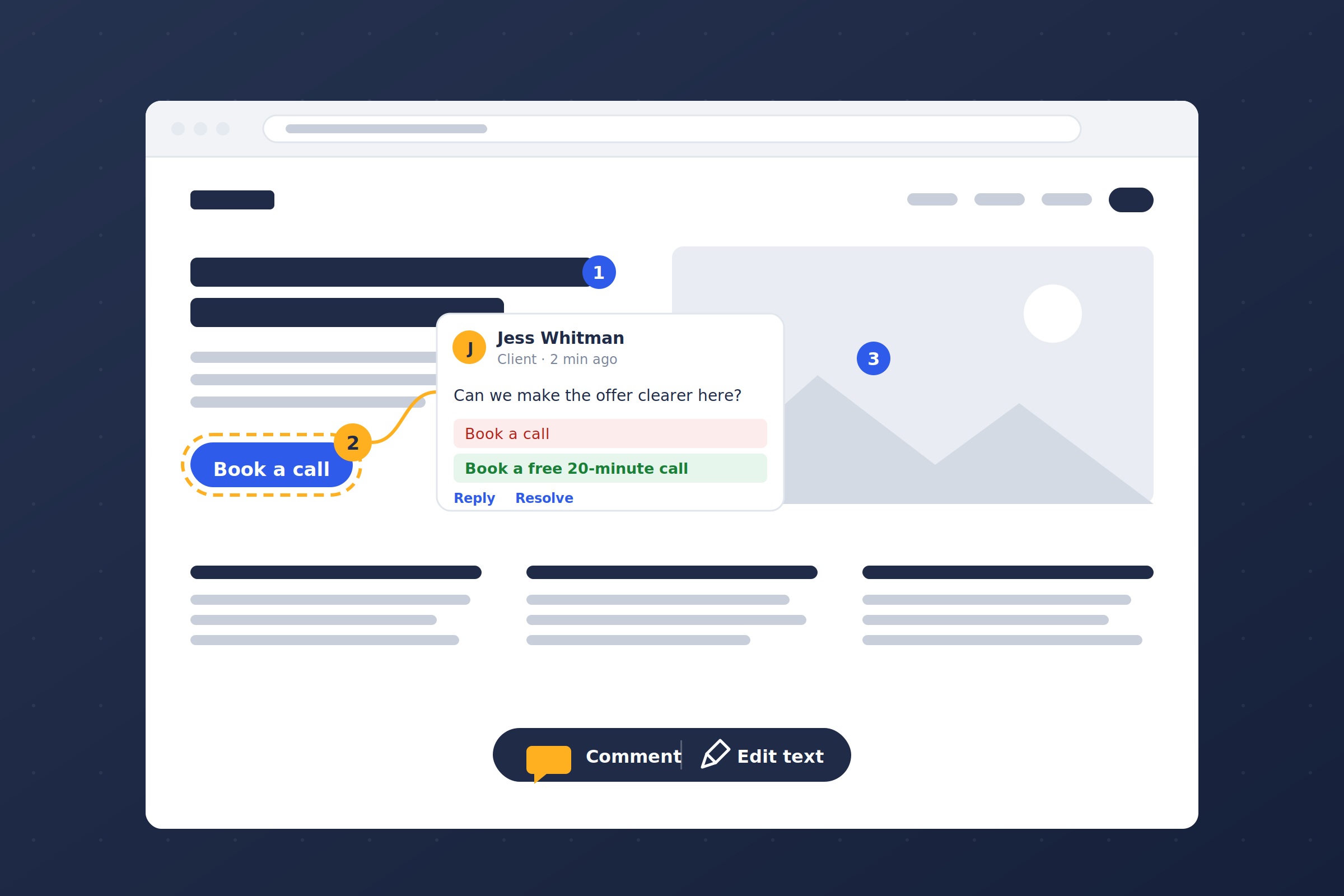
Every comment is pinned to the element the reviewer actually clicked, so there's nothing to translate.

Clients don't need an account

They open the link, give a name and an email once, and start commenting. No signup, no password, no confirmation email.

Copy edits come back ready to paste

Reviewers rewrite text right on the page. You get a before/after suggestion, not a description of what they'd like changed.

The right people hear about it

@mention someone or reply to them and they get an email that opens that exact comment on the page.

Key Features

Pin a comment to any element

A click is stored as a CSS path plus an offset inside that element, with page coordinates as a fallback — so pins stay put when the page reflows, the window resizes, or content above them changes height.

Rewrite copy in place

Edit text turns any run of text editable. The change is captured as a before/after suggestion and the live page is put straight back. Preview on page applies a stored suggestion in your own browser only — nothing on the site changes.

Attach images

File picker, drag-and-drop, or paste a screenshot from the clipboard. Up to four per comment, and an image on its own is a valid comment. Click any of them to see it full size.

Public feedback, private notes

Everyone gets the toolbar. Signed-in users who can manage feedback also get a Public / Private switch, and private notes are excluded from API responses at the database level — not hidden in the browser.

Mentions and notifications

Tag someone and they hear about it; reply and they hear about that. Every notification links to that comment and opens it highlighted. Mail goes through Postmark, and each person has their own row of switches, so one client can get resolutions and another can be spared them.

Threads, status, and an admin screen

Replies, resolve / reopen / delete, and a page sidebar filterable by open / resolved / private. A Feedback screen in wp-admin lists everything with search, status and visibility filters, inline suggestion diffs, image thumbnails, and a View on page link that reopens a pin in context.
What's Supported
Built to run on your own WordPress install — the Markup.io / Pastel workflow with nothing proxied through a third party.

Website Feedback

Comment Types

Pinned comments

Copy suggestions (before / after)

Image attachments

Threaded replies

Also Works With

Guest reviewers — name and email once, a cookie remembers them

Private notes for signed-in users who can manage feedback

Postmark for outbound email, with per-person notification switches

Any theme or page builder — pins attach to the rendered element, not the editor

Get WP Feedback

Get feedback that's easy to read

25