
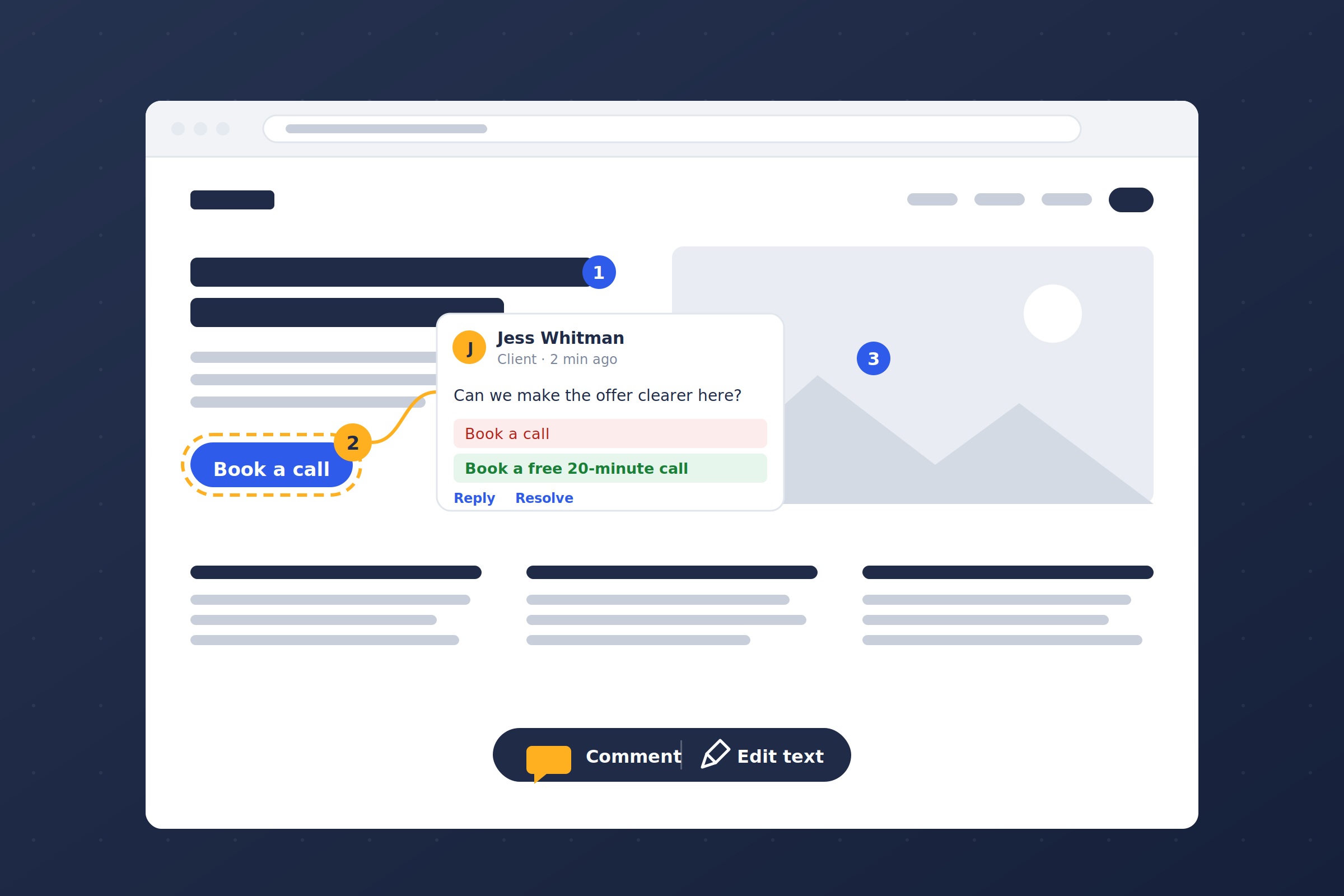
There are already good ways to collect website feedback. Markup.io and Pastel both do the click-anywhere overlay, and they do it well. If you’ve never used one, the idea is simple: your reviewer clicks the thing they mean, types what’s wrong, and the comment sticks to that spot on the page.
So why build another one?
Because I wanted that workflow living inside the site instead of outside it. The hosted tools solve the right problem in the wrong place. Here’s the reasoning, section by section.
Because “the third section feels off” isn’t a work order
Client feedback about a website almost never arrives in a form you can act on. It comes as a paragraph in an email. The third section feels off, and can the button be bigger? Which section? Which button? Which page?
The first half hour of every revision round is spent translating. You reply asking for clarification, they reply two days later with a screenshot of the wrong page, and the actual fix, when you finally get to it, takes eleven minutes.
Multiply that by every round on every project and the translation costs more than the work. That’s the thing I wanted to kill — not the feedback, the decoding.
Because the hosted tools put the site somewhere else
Markup.io and Pastel are good. I’m not knocking them. But they’re priced per seat, they live on someone else’s servers, and the site has to be pushed through their proxy to get the overlay on it.
For a solo practice with a handful of clients, that’s a subscription you’re paying so that a client can occasionally tell you a headline is wrong. And for the client, it’s yet another tool with yet another login, on top of the one they already have for the site itself.
I wanted the whole thing to happen where the work already is. Send a client a link. They click the thing they mean. They say what’s wrong. It lands in wp-admin, and an email goes to whoever needs to fix it. No proxy, no third party sitting between the client and their own website.
Because clients won’t create an account
This one is non-negotiable and every hosted tool gets it partly wrong.
The moment a reviewer hits a signup form, feedback stops. They mean to come back to it. They don’t. So the tool asks for a name and an email once, drops a cookie, and gets out of the way. No password, no confirmation email, no “check your inbox to verify.” They open the link and start clicking.
Because pins have to stay put
The technical problem I spent the most time on is a boring one: a comment pinned to a page has to still be in the right place tomorrow.
Pages reflow. Windows resize. Someone adds a paragraph above the thing the client commented on and every pixel coordinate on the page is now wrong. So a click isn’t stored as a coordinate. It’s stored as a CSS path to the element plus an offset inside it, with page coordinates only as a fallback. The pin follows the element, not the spot on the screen.
That sounds like a detail until you’ve opened a feedback tool and found every comment floating six inches from where it belonged.
Because copy edits should come back ready to paste
Half of all website feedback is copy. And the way it usually arrives is a description of a change rather than the change itself: make the intro punchier or the second sentence is too long.
So reviewers can edit text right on the page. They click, the text turns editable, they rewrite it, and what gets saved is a before/after suggestion. The live page snaps straight back — nothing on the site actually changes. You get the sentence they want, not a description of the sentence they want.
There’s also a preview mode that applies a stored suggestion in your own browser only, so you can see what it’d look like before you decide.
Because a screenshot is often the whole comment
Sometimes the fastest feedback is a picture. So you can attach images by file picker, drag-and-drop, or by pasting from the clipboard — up to four per comment. An image with no text at all is a valid comment. Click to see it full size.
Because I need to talk to myself without the client watching
Everyone who opens the link gets the toolbar. But signed-in users who can manage feedback also get a Public / Private switch.
Private notes are for the things you don’t say in front of the client. This whole section is going to get rebuilt anyway. Check whether the old plugin is still injecting this. And they’re excluded from API responses at the database level, not hidden in the browser with a CSS rule. Private means private.
Because the right person should find out, and nobody else
Mention someone and they get an email. Reply to someone and they get an email. Every notification links straight to that comment and opens it highlighted on the page, so nobody is scrolling around trying to find what you meant.
Mail goes through Postmark, and each person gets their own row of notification switches. One client wants to know every time something’s resolved. Another wants to be left alone until you ask them a direct question. Both are fine.
Because it has to be manageable after the fact
Comments thread. They resolve, reopen, and delete. There’s a sidebar on the page you can filter by open, resolved, or private. And there’s a Feedback screen in wp-admin that lists everything, with search, status and visibility filters, inline diffs for copy suggestions, image thumbnails, and a View on page link that drops you back at the pin in context.
That last part matters more than it sounds. A feedback tool that only works on the page is a feedback tool you forget about. Having it in the admin, next to everything else, is what turns it into a punch list.
Because it doesn’t care what built the page
Pins attach to the rendered element, not to anything in the editor. So it works with any theme and any page builder. Elementor, Gutenberg, a hand-coded template from 2016 — the client is clicking what they see, and what they see is what gets stored.
Where it actually pays off
Three places.
The revision round gets shorter
No decoding, no back-and-forth to locate the thing. You open the admin and there’s a list of exactly what to do, with the copy already written.
The client feels heard
Clicking the thing you mean and seeing your note stick to it is a small experience, but it’s a good one. It reads as care.
You stop paying rent on your own workflow
No per-seat subscription, no proxy, nothing of the client’s routed through a third party. The tool is a one-time cost and it lives on the install.
Try it on the next revision round
Don’t set it up on a finished site. Put it on the one that’s mid-build, send the client the link, and ask them to click on everything they want changed. Then open the Feedback screen and look at what came back.
That’s usually the moment it clicks, because the email you’d normally have gotten — the one with the paragraph about the third section — never arrives.
You can see the tool and get it here: WP Feedback.
If you use it on real client work and something’s missing that you need, tell me. Most of what’s in there came from exactly that.