
Every site I build starts somewhere other than where it ends up. It gets built on a dev server, or it gets moved over from an old site. Either way, full URLs get left behind in the content, and nobody notices until a link breaks on the live site.
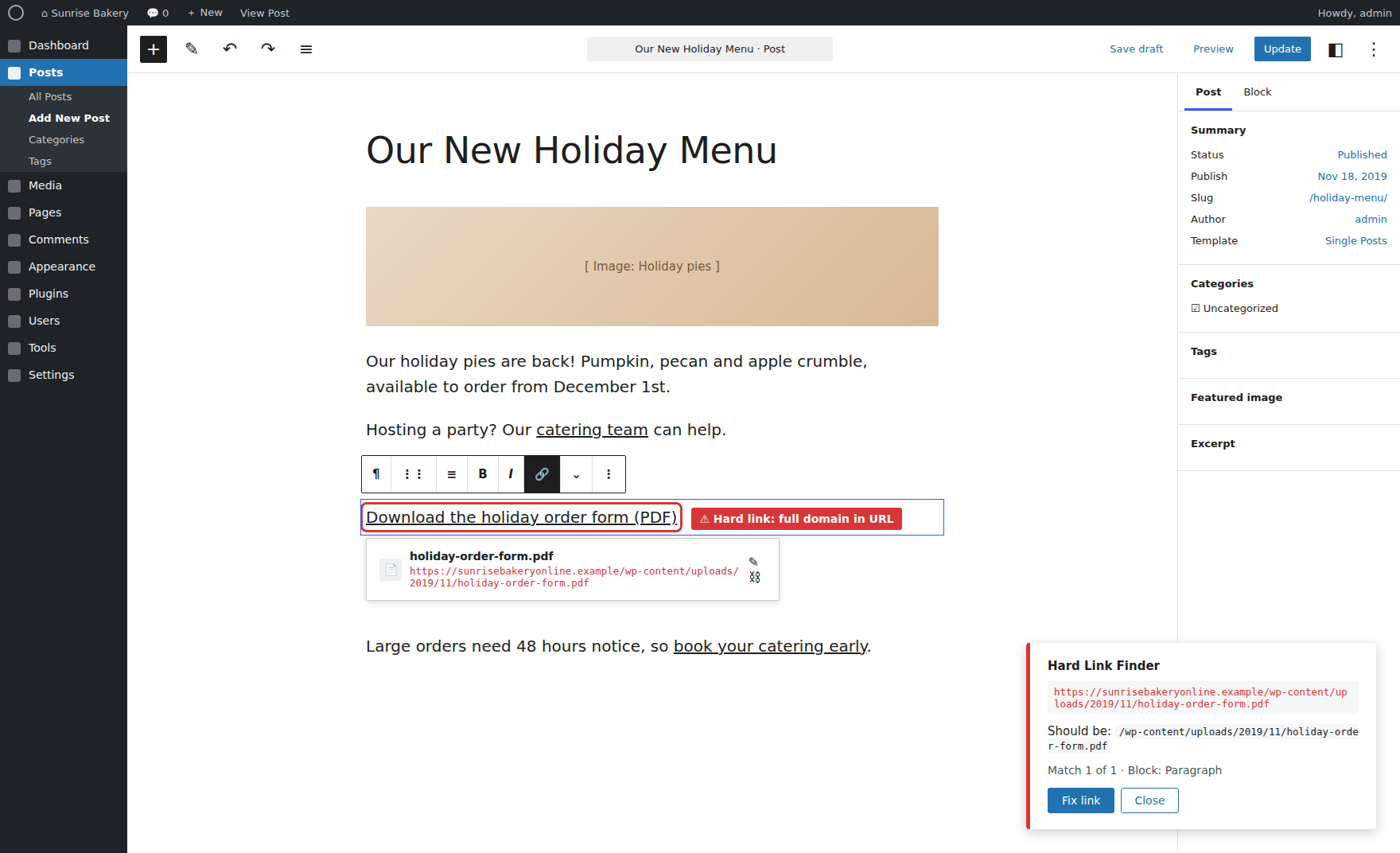
So I built Hard Link Finder, a WordPress plugin that finds hard-coded links in posts and pages and shows exactly where each one is. Here’s why.
What Is Hard Link Finder?
Hard Link Finder scans your WordPress posts and pages for hard-coded links that point at the dev site, a staging host, the old site or the live domain. It reports exactly where each one is and the relative URL it should be. It only reports, so it never changes your content.
Because “It Looks Fine” Isn’t the Same as “It’s Fine”
A page can look perfect on launch day and still have a PDF linked from mysite.local. It works on my machine because my machine is the dev site. It doesn’t work for the client’s customers. The first person to find it is usually someone trying to download the menu.
Because Search-Replace Doesn’t Catch Every Leftover Link
A migration search-replace does a lot of the work, and I’m not knocking it. But it only replaces what you tell it to look for. It won’t catch a staging URL from a host you forgot about, a file still pointing at the old domain, or a link someone pasted in from their browser halfway through the build. And it won’t tell you where any of it was.
Because Internal Links Should Be Relative
Internal links and files should be root-relative, like /about-us/ or /wp-content/uploads/2024/05/menu.pdf. A full link to the live domain works today, but it’s still a hard link. The next time the site moves, it breaks again. So the plugin flags those too, and shows you the relative URL each one should be.
Because Dev and Staging URLs Should Be Detected Automatically
I didn’t want another settings screen to fill out before it does anything. The plugin detects the dev site automatically. It also flags the usual staging and local suspects:
- WP Engine staging URLs like
mysite.wpengine.com localhostdev.andstaging.subdomains
For old sites, it catches any /wp-content/ file on another domain, plus any old domains you list.
Because Page Builders Hide Links Where You Can’t See Them
Links don’t just live in the post content anymore. They’re in Elementor data, Beaver Builder, Bricks, Themify, Cornerstone, Divi, WPBakery and ACF fields. Some are JSON-escaped, some are protocol-relative, and some are serialized. A plain text search misses most of them. Hard Link Finder scans content, excerpts, page builder data and the custom fields shown on the page, and finds the escaped and serialized ones too.
Because “It’s Somewhere on the Catering Page” Isn’t Good Enough
Knowing a bad link exists is half the job. The other half is finding it. Every result shows:
- Where it is, like “Catering (Page, publish)”, and the exact field
- The hard link and the relative URL it should be
- The surrounding text, and how many times it appears
- Edit, which opens the editor for that post or page
- View on page, which opens the page, scrolls to the link and outlines it (administrators only)
Because Not Every Hard Link Is the Same Problem
A broken PDF link matters more than a live URL that should be relative. So every result is sorted by problem (dev site, staging host, old site or absolute live URL) and by kind (page link, document, audio/video or other file). You can filter by both, search, sort, and export the whole list to CSV to hand off or check off.
Because Images Are a Special Case
Images on the dev or live site are skipped by default, since a migration search-replace fixes them and they’d bury everything else. Images on the old site or a staging host are always reported, because those are the ones that will break.
Because It Should Only Report, Never Rewrite
I didn’t want a tool that rewrites content on its own. One bad find-and-replace across a live site is a very long afternoon. Hard Link Finder never changes content. It tells you what’s wrong and where, and you fix it.
Because It Should Stay Focused on Your Content
It scans posts and pages that are published, scheduled, draft, pending and private. Headers, footers, templates, menus, widgets, settings and SEO data are not scanned. Links to other websites are ignored. The report stays focused on the content you actually edit.
Where It Actually Pays Off
- Launch day gets quieter. Dev and staging links get caught before the client’s customers find them.
- Migrations get finished. Old-site files and domains don’t linger in the content for months.
- Fixes take minutes, not an afternoon. You go straight to the field, see the link, and paste in the relative URL.
Try It Before Your Next Launch
Install it on the site you’re about to push live, run a scan, and work down the list. Whatever it finds is a link that would have broken.